Friday, 20 June 2008

Quick Review of Network Access Control (NAC) for Wireless Network

IT Division of International Islamic University (IIUM) has conducted series of Proof of Concept (PoC) by tested out five different Network Access Control (NAC) products to demonstrate its feasibility deployment on their heterogeneous wireless network. This project lead by Mr. Jaiz Anuar basically aim to determine the best solution to overcome the common technical problem facing by them, such as how to integrate and indirectly to control two different network segmentation. It also measures certain throughput which been used to identify the best solution that suit to their environment. In fact, the NAC features evaluated by them normally must able to protect their wireless network from any possible technique to perform network attacks.

The tested product during the PoC were Consentry, Infoexpress, Aruba ECS, Bradford and Juniper

Bridging provide an ad-hoc connection for the attacker be inside of any secure cooperate network. Since the network bridging technique capable to bypass the gateway security, it become the most critical feature need to be include in tested NAC. The NAC solutions must be able to detect the network bridging activities running by the users as follows:
  • bridging via UTP cable
  • bridging via Bluetooth
  • bridging via GPRS, Edge, 3G, HSDPA and 
  • other possible method of bridging such as via firewire, USB, PCMCIA etc.


The team also include other requirement as follows

  • the system must be able to quarantine or disconnect or isolate the users from the wireless network once they activate the bridging processes. .

In fact, most of the bridging activities is able to create a back door to any secure network. That’s why this feature is really really important to them

In addition, the overall design of network infrastructure in IIUM network considered as a heterogeneous network. They have add another important requirement for the test NAC appliance must be able to support multiple protocol such as 802.1x and non 802.1x including multiple OS platform: e.g Windows, Mac OS X and Linux Clients.

Finally after the PoC, Mr. Jaiz and his team conclude that, non of those 5 NAC 100% meet their requirement but they have rank all those product after taking into consideration a few aspect according to their network environment and end user experiences.

  1. Infoexpress
  2. Juniper
  3. Aruba ECS
  4. Bradford
  5. Consentry


What’s So Great About Deploying NAC in IIUM ?

The planning deployment of Network Access Control (NAC) technology aims to protect IIUM heterogeneous wireless networks from the public back door (possibly done through 3G, bluetooth, firewire, UTP, USB etc), and often dangerous, Internet. It also provides protection from viruses and other types of malware that may be resident on the mobile gadgets that staff, students and visitors connected into IIUM wireless networks. NAC places a virtual shield around a network by guarding its endpoints, the places where heterogeneous wireless networks mesh with the outside world.

A survey conducted earlier this year by Infonetics, a technology research firm located in San Jose, Calif., found that enterprises acquire NAC technology for various reasons, including blocking viruses (86 percent), intercepting external attacks (80 percent), stopping spyware/malware (73 percent) and blocking e-mail attacks (70 percent). Other motivations cited by the respondents included regulatory compliance (54 percent), adding LAN security (45 percent), blocking internal attacks (38 percent) and meeting customer and business partner demands (36 percent).

Much of NAC’s overall appeal comes from its simplicity, as well as its ability to provide enhanced security and more sanitized networks with little or no negative impact on the community productivity especially in IIUM. In fact, many instituition that have adopted NAC technology report improved productivity. By deploying this, IIUM Community are now free to use devices that were formerly banned from any other enterprises networks due to security concerns. By deploying NAC, ITD is trying to secure the wireless connection even browsing via smartphone or PDA since this devices is not really have a good antivirus software. The Symbian OS has been infected by mobile virus.

NAC often arrives on customer premises in the form of a network appliance. This approach is appealing to many enterprises, and the solution that ITD is looking for: the appliance must simply be plugged into the wireless network, providing fast, painless, out-of-the-box security and avoid changes to the existing configuration. Many NAC appliances are multifunction security devices, offering capabilities such as network-based virus scanning and intrusion prevention systems (IPSs) along with NAC capabilities. The appliance must be capable to integrate with the existing equipments.

Non-appliance-based approaches to NAC are more complex and tend to require a bit more hands-on work. The available alternate choices are to enforce NAC with functionality that’s built into network devices, such as switches, or to enforce NAC using SSL VPN gateways.

No network is airtight—malware continues to get in, whether via mobile gadget (PDA, smartphone), staff, student or guest laptops, or end users downloading dodgy content. Antivirus software at the gateway or on the desktop helps with computers under your control, but guests and unmanaged servers remain problematic. And let’s face it: Sometimes attackers are just smarter than we are. Even companies following best practices get hit.

Deploying NAC don’t just mean just security best practices, either. Protecting the network from malicious hosts is, ultimately, a desktop management function. NAC is what puts teeth in our policies, providing an enforcement mechanism that helps ensure computers are properly configured. By weighing such factors as whether a user is logged in; their computer’s patch level; and if anti-malware or desktop firewall software is installed, running and current, ITD can decide whether to limit access to network resources based on condition. A host that doesn’t comply with your defined policy could be directed to remediation servers, or put to the quarantine VLAN.

Remember Slammer? If a company could have determined that a host was running an unpatched version of MSDE 2000 and denied access until it was patched, Slammer would have had a much less dramatic effect.

With all the available choices, settling on the right NAC technology from the right vendor requires a significant amount of research. The final selection usually boils down to finding the product that most closely matches the IIUM’s NAC goals and the network’s size, complexity, budget and configuration

Quick Review of Network Access Control (NAC) for Wireless Network

IT Division of International Islamic University (IIUM) has conducted series of Proof of Concept (PoC) by tested out five different Network Access Control (NAC) products to demonstrate its feasibility deployment on their heterogeneous wireless network. This project lead by Mr. Jaiz Anuar basically aim to determine the best solution to overcome the common technical problem facing by them, such as how to integrate and indirectly to control two different network segmentation. It also measures certain throughput which been used to identify the best solution that suit to their environment. In fact, the NAC features evaluated by them normally must able to protect their wireless network from any possible technique to perform network attacks.

The tested product during the PoC were Consentry, Infoexpress, Aruba ECS, Bradford and Juniper

Bridging provide an ad-hoc connection for the attacker be inside of any secure cooperate network. Since the network bridging technique capable to bypass the gateway security, it become the most critical feature need to be include in tested NAC. The NAC solutions must be able to detect the network bridging activities running by the users as follows:
  • bridging via UTP cable
  • bridging via Bluetooth
  • bridging via GPRS, Edge, 3G, HSDPA and 
  • other possible method of bridging such as via firewire, USB, PCMCIA etc.


The team also include other requirement as follows

  • the system must be able to quarantine or disconnect or isolate the users from the wireless network once they activate the bridging processes. .

In fact, most of the bridging activities is able to create a back door to any secure network. That’s why this feature is really really important to them

In addition, the overall design of network infrastructure in IIUM network considered as a heterogeneous network. They have add another important requirement for the test NAC appliance must be able to support multiple protocol such as 802.1x and non 802.1x including multiple OS platform: e.g Windows, Mac OS X and Linux Clients.

Finally after the PoC, Mr. Jaiz and his team conclude that, non of those 5 NAC 100% meet their requirement but they have rank all those product after taking into consideration a few aspect according to their network environment and end user experiences.

  1. Infoexpress
  2. Juniper
  3. Aruba ECS
  4. Bradford
  5. Consentry


What’s So Great About Deploying NAC in IIUM ?

The planning deployment of Network Access Control (NAC) technology aims to protect IIUM heterogeneous wireless networks from the public back door (possibly done through 3G, bluetooth, firewire, UTP, USB etc), and often dangerous, Internet. It also provides protection from viruses and other types of malware that may be resident on the mobile gadgets that staff, students and visitors connected into IIUM wireless networks. NAC places a virtual shield around a network by guarding its endpoints, the places where heterogeneous wireless networks mesh with the outside world.

A survey conducted earlier this year by Infonetics, a technology research firm located in San Jose, Calif., found that enterprises acquire NAC technology for various reasons, including blocking viruses (86 percent), intercepting external attacks (80 percent), stopping spyware/malware (73 percent) and blocking e-mail attacks (70 percent). Other motivations cited by the respondents included regulatory compliance (54 percent), adding LAN security (45 percent), blocking internal attacks (38 percent) and meeting customer and business partner demands (36 percent).

Much of NAC’s overall appeal comes from its simplicity, as well as its ability to provide enhanced security and more sanitized networks with little or no negative impact on the community productivity especially in IIUM. In fact, many instituition that have adopted NAC technology report improved productivity. By deploying this, IIUM Community are now free to use devices that were formerly banned from any other enterprises networks due to security concerns. By deploying NAC, ITD is trying to secure the wireless connection even browsing via smartphone or PDA since this devices is not really have a good antivirus software. The Symbian OS has been infected by mobile virus.

NAC often arrives on customer premises in the form of a network appliance. This approach is appealing to many enterprises, and the solution that ITD is looking for: the appliance must simply be plugged into the wireless network, providing fast, painless, out-of-the-box security and avoid changes to the existing configuration. Many NAC appliances are multifunction security devices, offering capabilities such as network-based virus scanning and intrusion prevention systems (IPSs) along with NAC capabilities. The appliance must be capable to integrate with the existing equipments.

Non-appliance-based approaches to NAC are more complex and tend to require a bit more hands-on work. The available alternate choices are to enforce NAC with functionality that’s built into network devices, such as switches, or to enforce NAC using SSL VPN gateways.

No network is airtight—malware continues to get in, whether via mobile gadget (PDA, smartphone), staff, student or guest laptops, or end users downloading dodgy content. Antivirus software at the gateway or on the desktop helps with computers under your control, but guests and unmanaged servers remain problematic. And let’s face it: Sometimes attackers are just smarter than we are. Even companies following best practices get hit.

Deploying NAC don’t just mean just security best practices, either. Protecting the network from malicious hosts is, ultimately, a desktop management function. NAC is what puts teeth in our policies, providing an enforcement mechanism that helps ensure computers are properly configured. By weighing such factors as whether a user is logged in; their computer’s patch level; and if anti-malware or desktop firewall software is installed, running and current, ITD can decide whether to limit access to network resources based on condition. A host that doesn’t comply with your defined policy could be directed to remediation servers, or put to the quarantine VLAN.

Remember Slammer? If a company could have determined that a host was running an unpatched version of MSDE 2000 and denied access until it was patched, Slammer would have had a much less dramatic effect.

With all the available choices, settling on the right NAC technology from the right vendor requires a significant amount of research. The final selection usually boils down to finding the product that most closely matches the IIUM’s NAC goals and the network’s size, complexity, budget and configuration

Quick Review of Network Access Control (NAC) for Wireless Network

IT Division of International Islamic University (IIUM) has conducted series of Proof of Concept (PoC) by tested out five different Network Access Control (NAC) products to demonstrate its feasibility deployment on their heterogeneous wireless network. This project lead by Mr. Jaiz Anuar basically aim to determine the best solution to overcome the common technical problem facing by them, such as how to integrate and indirectly to control two different network segmentation. It also measures certain throughput which been used to identify the best solution that suit to their environment. In fact, the NAC features evaluated by them normally must able to protect their wireless network from any possible technique to perform network attacks.

The tested product during the PoC were Consentry, Infoexpress, Aruba ECS, Bradford and Juniper

Bridging provide an ad-hoc connection for the attacker be inside of any secure cooperate network. Since the network bridging technique capable to bypass the gateway security, it become the most critical feature need to be include in tested NAC. The NAC solutions must be able to detect the network bridging activities running by the users as follows:
  • bridging via UTP cable
  • bridging via Bluetooth
  • bridging via GPRS, Edge, 3G, HSDPA and 
  • other possible method of bridging such as via firewire, USB, PCMCIA etc.


The team also include other requirement as follows

  • the system must be able to quarantine or disconnect or isolate the users from the wireless network once they activate the bridging processes. .

In fact, most of the bridging activities is able to create a back door to any secure network. That’s why this feature is really really important to them

In addition, the overall design of network infrastructure in IIUM network considered as a heterogeneous network. They have add another important requirement for the test NAC appliance must be able to support multiple protocol such as 802.1x and non 802.1x including multiple OS platform: e.g Windows, Mac OS X and Linux Clients.

Finally after the PoC, Mr. Jaiz and his team conclude that, non of those 5 NAC 100% meet their requirement but they have rank all those product after taking into consideration a few aspect according to their network environment and end user experiences.

  1. Infoexpress
  2. Juniper
  3. Aruba ECS
  4. Bradford
  5. Consentry


What’s So Great About Deploying NAC in IIUM ?

The planning deployment of Network Access Control (NAC) technology aims to protect IIUM heterogeneous wireless networks from the public back door (possibly done through 3G, bluetooth, firewire, UTP, USB etc), and often dangerous, Internet. It also provides protection from viruses and other types of malware that may be resident on the mobile gadgets that staff, students and visitors connected into IIUM wireless networks. NAC places a virtual shield around a network by guarding its endpoints, the places where heterogeneous wireless networks mesh with the outside world.

A survey conducted earlier this year by Infonetics, a technology research firm located in San Jose, Calif., found that enterprises acquire NAC technology for various reasons, including blocking viruses (86 percent), intercepting external attacks (80 percent), stopping spyware/malware (73 percent) and blocking e-mail attacks (70 percent). Other motivations cited by the respondents included regulatory compliance (54 percent), adding LAN security (45 percent), blocking internal attacks (38 percent) and meeting customer and business partner demands (36 percent).

Much of NAC’s overall appeal comes from its simplicity, as well as its ability to provide enhanced security and more sanitized networks with little or no negative impact on the community productivity especially in IIUM. In fact, many instituition that have adopted NAC technology report improved productivity. By deploying this, IIUM Community are now free to use devices that were formerly banned from any other enterprises networks due to security concerns. By deploying NAC, ITD is trying to secure the wireless connection even browsing via smartphone or PDA since this devices is not really have a good antivirus software. The Symbian OS has been infected by mobile virus.

NAC often arrives on customer premises in the form of a network appliance. This approach is appealing to many enterprises, and the solution that ITD is looking for: the appliance must simply be plugged into the wireless network, providing fast, painless, out-of-the-box security and avoid changes to the existing configuration. Many NAC appliances are multifunction security devices, offering capabilities such as network-based virus scanning and intrusion prevention systems (IPSs) along with NAC capabilities. The appliance must be capable to integrate with the existing equipments.

Non-appliance-based approaches to NAC are more complex and tend to require a bit more hands-on work. The available alternate choices are to enforce NAC with functionality that’s built into network devices, such as switches, or to enforce NAC using SSL VPN gateways.

No network is airtight—malware continues to get in, whether via mobile gadget (PDA, smartphone), staff, student or guest laptops, or end users downloading dodgy content. Antivirus software at the gateway or on the desktop helps with computers under your control, but guests and unmanaged servers remain problematic. And let’s face it: Sometimes attackers are just smarter than we are. Even companies following best practices get hit.

Deploying NAC don’t just mean just security best practices, either. Protecting the network from malicious hosts is, ultimately, a desktop management function. NAC is what puts teeth in our policies, providing an enforcement mechanism that helps ensure computers are properly configured. By weighing such factors as whether a user is logged in; their computer’s patch level; and if anti-malware or desktop firewall software is installed, running and current, ITD can decide whether to limit access to network resources based on condition. A host that doesn’t comply with your defined policy could be directed to remediation servers, or put to the quarantine VLAN.

Remember Slammer? If a company could have determined that a host was running an unpatched version of MSDE 2000 and denied access until it was patched, Slammer would have had a much less dramatic effect.

With all the available choices, settling on the right NAC technology from the right vendor requires a significant amount of research. The final selection usually boils down to finding the product that most closely matches the IIUM’s NAC goals and the network’s size, complexity, budget and configuration

Sunday, 6 April 2008

WiMAX Forum Congress Asia 08

WiMAX Forum Congress Asia opens next wednesday and is set to be the biggest WiMAX event ever held in Asia.


Show Opening Times

Wednesday 9 April, 2008
08.00 - 18.30

Thursday 10 April, 2008
08.00 - 17.30


If you have not yet registered for your free exhibition pass it is not too late. Click here now to register, giving you access to over 80 key WiMAX players from across the whole ecosystem and 10 hours of FREE educational content at the FREE seminar program.

Designed for the entire WiMAX eco-system, WIMAX Forum Congress Asia will set the agenda and the critical business relationships for the mobile broadband industry.

WiMAX Forum Congress Asia 08

WiMAX Forum Congress Asia opens next wednesday and is set to be the biggest WiMAX event ever held in Asia.


Show Opening Times

Wednesday 9 April, 2008
08.00 - 18.30

Thursday 10 April, 2008
08.00 - 17.30


If you have not yet registered for your free exhibition pass it is not too late. Click here now to register, giving you access to over 80 key WiMAX players from across the whole ecosystem and 10 hours of FREE educational content at the FREE seminar program.

Designed for the entire WiMAX eco-system, WIMAX Forum Congress Asia will set the agenda and the critical business relationships for the mobile broadband industry.

WiMAX Forum Congress Asia 08

WiMAX Forum Congress Asia opens next wednesday and is set to be the biggest WiMAX event ever held in Asia.


Show Opening Times

Wednesday 9 April, 2008
08.00 - 18.30

Thursday 10 April, 2008
08.00 - 17.30


If you have not yet registered for your free exhibition pass it is not too late. Click here now to register, giving you access to over 80 key WiMAX players from across the whole ecosystem and 10 hours of FREE educational content at the FREE seminar program.

Designed for the entire WiMAX eco-system, WIMAX Forum Congress Asia will set the agenda and the critical business relationships for the mobile broadband industry.

WiMax vs WiFi

WiMax (802.16e) is a newer standard of wireless networking designed to provide the last mile of high speed internet access to the end user. Some people would call Wimax WiFi on steroids but this would be to broad of an assessment. Wifi was and still will be used in LAN environments for the foreseeable future. WiMax was designed to provide (MAN) Metropolitan Area Access, to homes and businesses.
WiMax base stations will have the ability to provide approximately 60 businesses with T1 access and hundreds of homes with DSL/Cable speed access…in theory. Engineers are stating that WiMax has the capability of reaching 30 Miles but real world testing has shown 4-8 mile working radius.

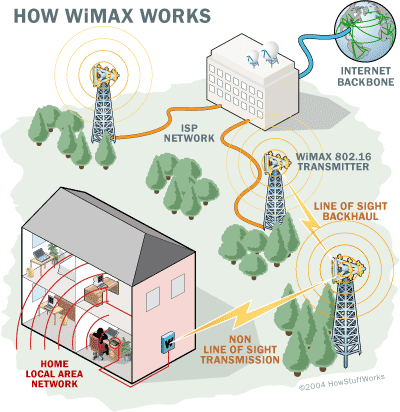
WiMax (MAN) deployments are similar to a WiFi network. First the ISP would have their T3 or higher access. The ISP would then use line of sight antennas (Bridges) to connect to towers that would distribute the non line of sight signal to (MAN) residential/business clients.

WiMax line of sight antennas operate at a higher Frequency up to 66mhz. Distribution antennas do not have to be in the line of sight with their clients. Non – line of sight towers operate on a range similar to WiFi . WiMax can operate right next to cell phone towers with no interference.
WiMax networks are similar to Wifi in deployment. The Wimax Base station/Tower will beam a signal to a WiMax Receiver. Similar to a WiFi access point sending a signal to a laptop. As far as I can tell laptops will be shipping with Wimax receivers in 2006.

Wimax Diagram

QOS (Quality of Service) is an major issue with WiMax because of the number of people accessing a tower at once. Some would think that a tower could be easily overloaded with a lot of people accessing it at once. Built into the WiMax standard is an algorithm that when the tower/base station is nearing capacity then it automatically will transfer the user to another WiMax tower or cell. Unlike a Wifi clients who have to kind of fight to stay associated with a given access point; WiMax will only have to perform this hand shake at the MAC level the first time they access the network.

WiMax is designed for building a network infrastructure when the environment or distance is not favorable to a wired network. Also, WiMax is a cheaper and quicker alternative than having to lay wire. Third world countries will greatly benefit from deploying WiMax networks. WiMax can handle virtually all the same protocols Wifi can including VOIP. African countries are now going to start deploying WiMax networks instead of cell phone networks. Disaster zones can also utilize WiMax giving them the ability to distribute crisis information quickly and cheaply.

Militaries are already using wireless technology to connect remote sites. Logistics will be simplified with the ease of tracking with RF technologies. WiMax can also handle Webcams and streaming video which would give commanders eyes on target capability. Just imagine if planes were able to drop preconfigured self deploying WiMax antennas in strategic areas giving troops real time battlefield intel. Armed with wireless cameras, drones and a GPS one soldier would truly be an Army of One.

As WiMax is deployed in more areas theory and real life capabilities of WiMax will come to light. The differences between WiMax and Wifi are simple. Think of a WiMax network as an ISP with out wires, with the signal providing your internet access to your business/ home. Wifi will be used within in your LAN for the near future.

Eric Meyer writes about networking wireless technology. Visit his blog here.