WiMAX Forum Congress Asia opens next wednesday and is set to be the biggest WiMAX event ever held in Asia.
Show Opening Times
Wednesday 9 April, 2008
08.00 - 18.30
Thursday 10 April, 2008
08.00 - 17.30
If you have not yet registered for your free exhibition pass it is not too late. Click here now to register, giving you access to over 80 key WiMAX players from across the whole ecosystem and 10 hours of FREE educational content at the FREE seminar program.
Designed for the entire WiMAX eco-system, WIMAX Forum Congress Asia will set the agenda and the critical business relationships for the mobile broadband industry.
Sunday, 6 April 2008

WiMAX Forum Congress Asia 08
WiMAX Forum Congress Asia opens next wednesday and is set to be the biggest WiMAX event ever held in Asia.
Show Opening Times
Wednesday 9 April, 2008
08.00 - 18.30
Thursday 10 April, 2008
08.00 - 17.30
If you have not yet registered for your free exhibition pass it is not too late. Click here now to register, giving you access to over 80 key WiMAX players from across the whole ecosystem and 10 hours of FREE educational content at the FREE seminar program.
Designed for the entire WiMAX eco-system, WIMAX Forum Congress Asia will set the agenda and the critical business relationships for the mobile broadband industry.
Show Opening Times
Wednesday 9 April, 2008
08.00 - 18.30
Thursday 10 April, 2008
08.00 - 17.30
If you have not yet registered for your free exhibition pass it is not too late. Click here now to register, giving you access to over 80 key WiMAX players from across the whole ecosystem and 10 hours of FREE educational content at the FREE seminar program.
Designed for the entire WiMAX eco-system, WIMAX Forum Congress Asia will set the agenda and the critical business relationships for the mobile broadband industry.
WiMAX Forum Congress Asia 08
WiMAX Forum Congress Asia opens next wednesday and is set to be the biggest WiMAX event ever held in Asia.
Show Opening Times
Wednesday 9 April, 2008
08.00 - 18.30
Thursday 10 April, 2008
08.00 - 17.30
If you have not yet registered for your free exhibition pass it is not too late. Click here now to register, giving you access to over 80 key WiMAX players from across the whole ecosystem and 10 hours of FREE educational content at the FREE seminar program.
Designed for the entire WiMAX eco-system, WIMAX Forum Congress Asia will set the agenda and the critical business relationships for the mobile broadband industry.
Show Opening Times
Wednesday 9 April, 2008
08.00 - 18.30
Thursday 10 April, 2008
08.00 - 17.30
If you have not yet registered for your free exhibition pass it is not too late. Click here now to register, giving you access to over 80 key WiMAX players from across the whole ecosystem and 10 hours of FREE educational content at the FREE seminar program.
Designed for the entire WiMAX eco-system, WIMAX Forum Congress Asia will set the agenda and the critical business relationships for the mobile broadband industry.
WiMax vs WiFi
WiMax (802.16e) is a newer standard of wireless networking designed to provide the last mile of high speed internet access to the end user. Some people would call Wimax WiFi on steroids but this would be to broad of an assessment. Wifi was and still will be used in LAN environments for the foreseeable future. WiMax was designed to provide (MAN) Metropolitan Area Access, to homes and businesses.
WiMax base stations will have the ability to provide approximately 60 businesses with T1 access and hundreds of homes with DSL/Cable speed access…in theory. Engineers are stating that WiMax has the capability of reaching 30 Miles but real world testing has shown 4-8 mile working radius.
WiMax (MAN) deployments are similar to a WiFi network. First the ISP would have their T3 or higher access. The ISP would then use line of sight antennas (Bridges) to connect to towers that would distribute the non line of sight signal to (MAN) residential/business clients.
WiMax line of sight antennas operate at a higher Frequency up to 66mhz. Distribution antennas do not have to be in the line of sight with their clients. Non – line of sight towers operate on a range similar to WiFi . WiMax can operate right next to cell phone towers with no interference.
WiMax networks are similar to Wifi in deployment. The Wimax Base station/Tower will beam a signal to a WiMax Receiver. Similar to a WiFi access point sending a signal to a laptop. As far as I can tell laptops will be shipping with Wimax receivers in 2006.
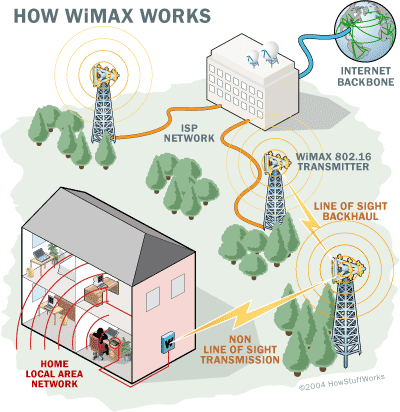
QOS (Quality of Service) is an major issue with WiMax because of the number of people accessing a tower at once. Some would think that a tower could be easily overloaded with a lot of people accessing it at once. Built into the WiMax standard is an algorithm that when the tower/base station is nearing capacity then it automatically will transfer the user to another WiMax tower or cell. Unlike a Wifi clients who have to kind of fight to stay associated with a given access point; WiMax will only have to perform this hand shake at the MAC level the first time they access the network.
WiMax is designed for building a network infrastructure when the environment or distance is not favorable to a wired network. Also, WiMax is a cheaper and quicker alternative than having to lay wire. Third world countries will greatly benefit from deploying WiMax networks. WiMax can handle virtually all the same protocols Wifi can including VOIP. African countries are now going to start deploying WiMax networks instead of cell phone networks. Disaster zones can also utilize WiMax giving them the ability to distribute crisis information quickly and cheaply.
Militaries are already using wireless technology to connect remote sites. Logistics will be simplified with the ease of tracking with RF technologies. WiMax can also handle Webcams and streaming video which would give commanders eyes on target capability. Just imagine if planes were able to drop preconfigured self deploying WiMax antennas in strategic areas giving troops real time battlefield intel. Armed with wireless cameras, drones and a GPS one soldier would truly be an Army of One.
As WiMax is deployed in more areas theory and real life capabilities of WiMax will come to light. The differences between WiMax and Wifi are simple. Think of a WiMax network as an ISP with out wires, with the signal providing your internet access to your business/ home. Wifi will be used within in your LAN for the near future.
Eric Meyer writes about networking wireless technology. Visit his blog here.
WiMax base stations will have the ability to provide approximately 60 businesses with T1 access and hundreds of homes with DSL/Cable speed access…in theory. Engineers are stating that WiMax has the capability of reaching 30 Miles but real world testing has shown 4-8 mile working radius.
WiMax (MAN) deployments are similar to a WiFi network. First the ISP would have their T3 or higher access. The ISP would then use line of sight antennas (Bridges) to connect to towers that would distribute the non line of sight signal to (MAN) residential/business clients.
WiMax line of sight antennas operate at a higher Frequency up to 66mhz. Distribution antennas do not have to be in the line of sight with their clients. Non – line of sight towers operate on a range similar to WiFi . WiMax can operate right next to cell phone towers with no interference.
WiMax networks are similar to Wifi in deployment. The Wimax Base station/Tower will beam a signal to a WiMax Receiver. Similar to a WiFi access point sending a signal to a laptop. As far as I can tell laptops will be shipping with Wimax receivers in 2006.
QOS (Quality of Service) is an major issue with WiMax because of the number of people accessing a tower at once. Some would think that a tower could be easily overloaded with a lot of people accessing it at once. Built into the WiMax standard is an algorithm that when the tower/base station is nearing capacity then it automatically will transfer the user to another WiMax tower or cell. Unlike a Wifi clients who have to kind of fight to stay associated with a given access point; WiMax will only have to perform this hand shake at the MAC level the first time they access the network.
WiMax is designed for building a network infrastructure when the environment or distance is not favorable to a wired network. Also, WiMax is a cheaper and quicker alternative than having to lay wire. Third world countries will greatly benefit from deploying WiMax networks. WiMax can handle virtually all the same protocols Wifi can including VOIP. African countries are now going to start deploying WiMax networks instead of cell phone networks. Disaster zones can also utilize WiMax giving them the ability to distribute crisis information quickly and cheaply.
Militaries are already using wireless technology to connect remote sites. Logistics will be simplified with the ease of tracking with RF technologies. WiMax can also handle Webcams and streaming video which would give commanders eyes on target capability. Just imagine if planes were able to drop preconfigured self deploying WiMax antennas in strategic areas giving troops real time battlefield intel. Armed with wireless cameras, drones and a GPS one soldier would truly be an Army of One.
As WiMax is deployed in more areas theory and real life capabilities of WiMax will come to light. The differences between WiMax and Wifi are simple. Think of a WiMax network as an ISP with out wires, with the signal providing your internet access to your business/ home. Wifi will be used within in your LAN for the near future.
Eric Meyer writes about networking wireless technology. Visit his blog here.
WiMax vs WiFi
WiMax (802.16e) is a newer standard of wireless networking designed to provide the last mile of high speed internet access to the end user. Some people would call Wimax WiFi on steroids but this would be to broad of an assessment. Wifi was and still will be used in LAN environments for the foreseeable future. WiMax was designed to provide (MAN) Metropolitan Area Access, to homes and businesses.
WiMax base stations will have the ability to provide approximately 60 businesses with T1 access and hundreds of homes with DSL/Cable speed access…in theory. Engineers are stating that WiMax has the capability of reaching 30 Miles but real world testing has shown 4-8 mile working radius.
WiMax (MAN) deployments are similar to a WiFi network. First the ISP would have their T3 or higher access. The ISP would then use line of sight antennas (Bridges) to connect to towers that would distribute the non line of sight signal to (MAN) residential/business clients.
WiMax line of sight antennas operate at a higher Frequency up to 66mhz. Distribution antennas do not have to be in the line of sight with their clients. Non – line of sight towers operate on a range similar to WiFi . WiMax can operate right next to cell phone towers with no interference.
WiMax networks are similar to Wifi in deployment. The Wimax Base station/Tower will beam a signal to a WiMax Receiver. Similar to a WiFi access point sending a signal to a laptop. As far as I can tell laptops will be shipping with Wimax receivers in 2006.
QOS (Quality of Service) is an major issue with WiMax because of the number of people accessing a tower at once. Some would think that a tower could be easily overloaded with a lot of people accessing it at once. Built into the WiMax standard is an algorithm that when the tower/base station is nearing capacity then it automatically will transfer the user to another WiMax tower or cell. Unlike a Wifi clients who have to kind of fight to stay associated with a given access point; WiMax will only have to perform this hand shake at the MAC level the first time they access the network.
WiMax is designed for building a network infrastructure when the environment or distance is not favorable to a wired network. Also, WiMax is a cheaper and quicker alternative than having to lay wire. Third world countries will greatly benefit from deploying WiMax networks. WiMax can handle virtually all the same protocols Wifi can including VOIP. African countries are now going to start deploying WiMax networks instead of cell phone networks. Disaster zones can also utilize WiMax giving them the ability to distribute crisis information quickly and cheaply.
Militaries are already using wireless technology to connect remote sites. Logistics will be simplified with the ease of tracking with RF technologies. WiMax can also handle Webcams and streaming video which would give commanders eyes on target capability. Just imagine if planes were able to drop preconfigured self deploying WiMax antennas in strategic areas giving troops real time battlefield intel. Armed with wireless cameras, drones and a GPS one soldier would truly be an Army of One.
As WiMax is deployed in more areas theory and real life capabilities of WiMax will come to light. The differences between WiMax and Wifi are simple. Think of a WiMax network as an ISP with out wires, with the signal providing your internet access to your business/ home. Wifi will be used within in your LAN for the near future.
Eric Meyer writes about networking wireless technology. Visit his blog here.
WiMax base stations will have the ability to provide approximately 60 businesses with T1 access and hundreds of homes with DSL/Cable speed access…in theory. Engineers are stating that WiMax has the capability of reaching 30 Miles but real world testing has shown 4-8 mile working radius.
WiMax (MAN) deployments are similar to a WiFi network. First the ISP would have their T3 or higher access. The ISP would then use line of sight antennas (Bridges) to connect to towers that would distribute the non line of sight signal to (MAN) residential/business clients.
WiMax line of sight antennas operate at a higher Frequency up to 66mhz. Distribution antennas do not have to be in the line of sight with their clients. Non – line of sight towers operate on a range similar to WiFi . WiMax can operate right next to cell phone towers with no interference.
WiMax networks are similar to Wifi in deployment. The Wimax Base station/Tower will beam a signal to a WiMax Receiver. Similar to a WiFi access point sending a signal to a laptop. As far as I can tell laptops will be shipping with Wimax receivers in 2006.
QOS (Quality of Service) is an major issue with WiMax because of the number of people accessing a tower at once. Some would think that a tower could be easily overloaded with a lot of people accessing it at once. Built into the WiMax standard is an algorithm that when the tower/base station is nearing capacity then it automatically will transfer the user to another WiMax tower or cell. Unlike a Wifi clients who have to kind of fight to stay associated with a given access point; WiMax will only have to perform this hand shake at the MAC level the first time they access the network.
WiMax is designed for building a network infrastructure when the environment or distance is not favorable to a wired network. Also, WiMax is a cheaper and quicker alternative than having to lay wire. Third world countries will greatly benefit from deploying WiMax networks. WiMax can handle virtually all the same protocols Wifi can including VOIP. African countries are now going to start deploying WiMax networks instead of cell phone networks. Disaster zones can also utilize WiMax giving them the ability to distribute crisis information quickly and cheaply.
Militaries are already using wireless technology to connect remote sites. Logistics will be simplified with the ease of tracking with RF technologies. WiMax can also handle Webcams and streaming video which would give commanders eyes on target capability. Just imagine if planes were able to drop preconfigured self deploying WiMax antennas in strategic areas giving troops real time battlefield intel. Armed with wireless cameras, drones and a GPS one soldier would truly be an Army of One.
As WiMax is deployed in more areas theory and real life capabilities of WiMax will come to light. The differences between WiMax and Wifi are simple. Think of a WiMax network as an ISP with out wires, with the signal providing your internet access to your business/ home. Wifi will be used within in your LAN for the near future.
Eric Meyer writes about networking wireless technology. Visit his blog here.
WiMax vs WiFi
WiMax (802.16e) is a newer standard of wireless networking designed to provide the last mile of high speed internet access to the end user. Some people would call Wimax WiFi on steroids but this would be to broad of an assessment. Wifi was and still will be used in LAN environments for the foreseeable future. WiMax was designed to provide (MAN) Metropolitan Area Access, to homes and businesses.
WiMax base stations will have the ability to provide approximately 60 businesses with T1 access and hundreds of homes with DSL/Cable speed access…in theory. Engineers are stating that WiMax has the capability of reaching 30 Miles but real world testing has shown 4-8 mile working radius.
WiMax (MAN) deployments are similar to a WiFi network. First the ISP would have their T3 or higher access. The ISP would then use line of sight antennas (Bridges) to connect to towers that would distribute the non line of sight signal to (MAN) residential/business clients.
WiMax line of sight antennas operate at a higher Frequency up to 66mhz. Distribution antennas do not have to be in the line of sight with their clients. Non – line of sight towers operate on a range similar to WiFi . WiMax can operate right next to cell phone towers with no interference.
WiMax networks are similar to Wifi in deployment. The Wimax Base station/Tower will beam a signal to a WiMax Receiver. Similar to a WiFi access point sending a signal to a laptop. As far as I can tell laptops will be shipping with Wimax receivers in 2006.
QOS (Quality of Service) is an major issue with WiMax because of the number of people accessing a tower at once. Some would think that a tower could be easily overloaded with a lot of people accessing it at once. Built into the WiMax standard is an algorithm that when the tower/base station is nearing capacity then it automatically will transfer the user to another WiMax tower or cell. Unlike a Wifi clients who have to kind of fight to stay associated with a given access point; WiMax will only have to perform this hand shake at the MAC level the first time they access the network.
WiMax is designed for building a network infrastructure when the environment or distance is not favorable to a wired network. Also, WiMax is a cheaper and quicker alternative than having to lay wire. Third world countries will greatly benefit from deploying WiMax networks. WiMax can handle virtually all the same protocols Wifi can including VOIP. African countries are now going to start deploying WiMax networks instead of cell phone networks. Disaster zones can also utilize WiMax giving them the ability to distribute crisis information quickly and cheaply.
Militaries are already using wireless technology to connect remote sites. Logistics will be simplified with the ease of tracking with RF technologies. WiMax can also handle Webcams and streaming video which would give commanders eyes on target capability. Just imagine if planes were able to drop preconfigured self deploying WiMax antennas in strategic areas giving troops real time battlefield intel. Armed with wireless cameras, drones and a GPS one soldier would truly be an Army of One.
As WiMax is deployed in more areas theory and real life capabilities of WiMax will come to light. The differences between WiMax and Wifi are simple. Think of a WiMax network as an ISP with out wires, with the signal providing your internet access to your business/ home. Wifi will be used within in your LAN for the near future.
Eric Meyer writes about networking wireless technology. Visit his blog here.
WiMax base stations will have the ability to provide approximately 60 businesses with T1 access and hundreds of homes with DSL/Cable speed access…in theory. Engineers are stating that WiMax has the capability of reaching 30 Miles but real world testing has shown 4-8 mile working radius.
WiMax (MAN) deployments are similar to a WiFi network. First the ISP would have their T3 or higher access. The ISP would then use line of sight antennas (Bridges) to connect to towers that would distribute the non line of sight signal to (MAN) residential/business clients.
WiMax line of sight antennas operate at a higher Frequency up to 66mhz. Distribution antennas do not have to be in the line of sight with their clients. Non – line of sight towers operate on a range similar to WiFi . WiMax can operate right next to cell phone towers with no interference.
WiMax networks are similar to Wifi in deployment. The Wimax Base station/Tower will beam a signal to a WiMax Receiver. Similar to a WiFi access point sending a signal to a laptop. As far as I can tell laptops will be shipping with Wimax receivers in 2006.
QOS (Quality of Service) is an major issue with WiMax because of the number of people accessing a tower at once. Some would think that a tower could be easily overloaded with a lot of people accessing it at once. Built into the WiMax standard is an algorithm that when the tower/base station is nearing capacity then it automatically will transfer the user to another WiMax tower or cell. Unlike a Wifi clients who have to kind of fight to stay associated with a given access point; WiMax will only have to perform this hand shake at the MAC level the first time they access the network.
WiMax is designed for building a network infrastructure when the environment or distance is not favorable to a wired network. Also, WiMax is a cheaper and quicker alternative than having to lay wire. Third world countries will greatly benefit from deploying WiMax networks. WiMax can handle virtually all the same protocols Wifi can including VOIP. African countries are now going to start deploying WiMax networks instead of cell phone networks. Disaster zones can also utilize WiMax giving them the ability to distribute crisis information quickly and cheaply.
Militaries are already using wireless technology to connect remote sites. Logistics will be simplified with the ease of tracking with RF technologies. WiMax can also handle Webcams and streaming video which would give commanders eyes on target capability. Just imagine if planes were able to drop preconfigured self deploying WiMax antennas in strategic areas giving troops real time battlefield intel. Armed with wireless cameras, drones and a GPS one soldier would truly be an Army of One.
As WiMax is deployed in more areas theory and real life capabilities of WiMax will come to light. The differences between WiMax and Wifi are simple. Think of a WiMax network as an ISP with out wires, with the signal providing your internet access to your business/ home. Wifi will be used within in your LAN for the near future.
Eric Meyer writes about networking wireless technology. Visit his blog here.
Thursday, 13 March 2008
Aruba secures endpoints with NAC interop and product.
Frank Bulk wrote
By Frank Bulk
Aruba Networks most recent announcement regarding NAC interoperability verification and a product announcement repeat a common anthem of this vendor's emphasis on security.
The three major NAC groups are Cisco, Microsoft NAP, and the Trusted Computing Group (TCG); the first two are clearly vendor driven, while the last is standards-based and enjoys broader industry support. Unable to drive a standard of its own, Aruba has not hitched itself to any single group, but has verified NAC interoperability with three technology industry heavyweights: Cisco, Juniper, and Microsoft. Working with network equipment market share leader Cisco is almost a de facto requirement, and Microsoft is Aruba's largest customer, if not most significant. This shouldn't be considered Aruba's first fore into NAC: they have partnerships with Bradford, FireEye, Fortinet, InfoExpress, Snort, and as well as Symantec (via Sygate, though this is end-of-sale).
In addition to their partnerships, Aruba has also announced a new appliance for "targeted industries". To date Aruba has built most of the products it sells, preferring to partner where necessary. Ash Chowdappa, director of mobility management system, stated in a briefing, that Aruba will wait until the NAC market shakes out before considering to develop something internally. This time around Aruba OEMed their Aruba Endpoint Compliance System (ECS) appliance from a vendor that has significant success in the higher education market.According to Chowdappa, higher education is Aruba's number one vertical, and they expect ECS to gain traction in healthcare and hospitality, markets where there are significant numbers of guest users. Aruba makes the point that many NAC vendors are targeted toward managed devices such as desktops and laptops, while ECS is able to deal with unmanaged and transient devices such as Vo-Fi phones, and the occasional Sony Wii, that may not be able to run an agent. For devices in this latter group Aruba's ECS can work in tandem with their mobility controller to implement more restrictive traffic policies leveraging Aruba's stateful firewall. And this appliance isn't restricted to just wireless products, as the appliance can take trunked wired traffic, such as guest VLANs, and enforce policy on those, too.
Aruba is making the right moves in offering its customers multiple NAC options resulting in great stickiness for their core wireless LAN products. One of the challenges that Aruba faces is that organizations may look first to their wired networking equipment vendor for a NAC product, giving Cisco a natural leg up. Aruba appears to have chosen to OEM a mature product that integrates with systems in both mediums, and with eventual implementation of 802.11n, may take a larger and larger portion of IT's mindshare and networking budget.
Subscribe to:
Posts (Atom)