The XtremeMac Tango TRX 2.1 Bluetooth audio system allows users of iPhone, iPad and iPod touch (2nd gen) to stream their favourite songs wirelessly to the device.
Manufactured by Imation, the TRX also has a dock to hold and charge the iPhone or iPod Touch.
The audio system's two midrange drivers, two dome tweeters and a downward firing subwoofer produce clear and dynamic sound, the company claimed.
The TRX also has five buttons for controlling playback, bass, treble and other features directly.
You can also control the device using the bundled infrared remote or with a Tango TRX application that can be downloaded from the App Store for free.
The app turns the iPod, iPhone and iPad into a virtual remote and is identical to the physical remote in looks and features. The app also comes with a five-band equaliser that allows users to fine tune the audio output.
Also, both the remote and the Tango TRX app can be used to control the device's functions from up to 30ft (9.14m) away. However, the physical remote requires line-of-sight to work.
The audio system also features LED status indicators and a line-in jack for connecting other audio devices.
Showing posts with label App Store. Show all posts
Friday, 28 January 2011
Quick review of XtremeMac Tango TRX
The XtremeMac Tango TRX 2.1 Bluetooth audio system allows users of iPhone, iPad and iPod touch (2nd gen) to stream their favourite songs wirelessly to the device.
Manufactured by Imation, the TRX also has a dock to hold and charge the iPhone or iPod Touch.
The audio system's two midrange drivers, two dome tweeters and a downward firing subwoofer produce clear and dynamic sound, the company claimed.
The TRX also has five buttons for controlling playback, bass, treble and other features directly.
You can also control the device using the bundled infrared remote or with a Tango TRX application that can be downloaded from the App Store for free.
The app turns the iPod, iPhone and iPad into a virtual remote and is identical to the physical remote in looks and features. The app also comes with a five-band equaliser that allows users to fine tune the audio output.
Also, both the remote and the Tango TRX app can be used to control the device's functions from up to 30ft (9.14m) away. However, the physical remote requires line-of-sight to work.
The audio system also features LED status indicators and a line-in jack for connecting other audio devices.
Manufactured by Imation, the TRX also has a dock to hold and charge the iPhone or iPod Touch.
The audio system's two midrange drivers, two dome tweeters and a downward firing subwoofer produce clear and dynamic sound, the company claimed.
The TRX also has five buttons for controlling playback, bass, treble and other features directly.
You can also control the device using the bundled infrared remote or with a Tango TRX application that can be downloaded from the App Store for free.
The app turns the iPod, iPhone and iPad into a virtual remote and is identical to the physical remote in looks and features. The app also comes with a five-band equaliser that allows users to fine tune the audio output.
Also, both the remote and the Tango TRX app can be used to control the device's functions from up to 30ft (9.14m) away. However, the physical remote requires line-of-sight to work.
The audio system also features LED status indicators and a line-in jack for connecting other audio devices.
Quick review of XtremeMac Tango TRX
The XtremeMac Tango TRX 2.1 Bluetooth audio system allows users of iPhone, iPad and iPod touch (2nd gen) to stream their favourite songs wirelessly to the device.
Manufactured by Imation, the TRX also has a dock to hold and charge the iPhone or iPod Touch.
The audio system's two midrange drivers, two dome tweeters and a downward firing subwoofer produce clear and dynamic sound, the company claimed.
The TRX also has five buttons for controlling playback, bass, treble and other features directly.
You can also control the device using the bundled infrared remote or with a Tango TRX application that can be downloaded from the App Store for free.
The app turns the iPod, iPhone and iPad into a virtual remote and is identical to the physical remote in looks and features. The app also comes with a five-band equaliser that allows users to fine tune the audio output.
Also, both the remote and the Tango TRX app can be used to control the device's functions from up to 30ft (9.14m) away. However, the physical remote requires line-of-sight to work.
The audio system also features LED status indicators and a line-in jack for connecting other audio devices.
Manufactured by Imation, the TRX also has a dock to hold and charge the iPhone or iPod Touch.
The audio system's two midrange drivers, two dome tweeters and a downward firing subwoofer produce clear and dynamic sound, the company claimed.
The TRX also has five buttons for controlling playback, bass, treble and other features directly.
You can also control the device using the bundled infrared remote or with a Tango TRX application that can be downloaded from the App Store for free.
The app turns the iPod, iPhone and iPad into a virtual remote and is identical to the physical remote in looks and features. The app also comes with a five-band equaliser that allows users to fine tune the audio output.
Also, both the remote and the Tango TRX app can be used to control the device's functions from up to 30ft (9.14m) away. However, the physical remote requires line-of-sight to work.
The audio system also features LED status indicators and a line-in jack for connecting other audio devices.
Thursday, 6 January 2011
Quick review of Mac App Store
With the Mac App Store, getting the apps you want on your Mac has never been easier. No more boxes, no more disks, no more time-consuming installation. Click once to download and install any app on your Mac. The Mac App Store is now available as a software update for any Mac running Mac OS X Snow Leopard.
more free apps
SEATTLE: Apple Inc is expanding the "app store" idea that caught fire on the iPhone and iPad to its line of Mac computers.
Mac users who have the latest version of Apple's computer operating system, called Snow Leopard, will be prompted to update their software. When the upgrade is complete, an icon for the new Mac app store will appear in the dock.
After launching the store software, people can browse through more than 1,000 programs for Macs. Some are free, and some will cost money; people can log in and buy software using their existing iTunes account information.
As with the existing app stores for Apple's other gadgets, people can see lists of the most popular programs and rate software they purchase.
Also similar to the existing system, software developers will name their own prices. Apple will vet all of the applications before they're accepted for sale in the store.
The iPad and iPhone have been successful in part because of the tens of thousands of games and other programs available as free or paid downloads in Apple's app stores.
Apple may be looking to the Mac app store to boost interest in its computers, which make up a tiny but growing percentage of the PC market.
The arrival of the app store for mobile gadgets "dramatically changed how software is discovered and purchased," said Phil Schiller, Apple's top product marketing executive, in an interview. "It will have a big impact in the desktop world as well."
Among the programs for sale are Apple's own iLife programs for organising photos, editing video and other tasks, which will be sold separately for US$14.99 each, and iWork programs for creating documents, spreadsheets and presentations, for US$19.99 each.
The Mac app store is available in 90 countries. People who use older versions of the Mac operating system will not be able to access the app store. - AP
Quick review of Mac App Store
With the Mac App Store, getting the apps you want on your Mac has never been easier. No more boxes, no more disks, no more time-consuming installation. Click once to download and install any app on your Mac. The Mac App Store is now available as a software update for any Mac running Mac OS X Snow Leopard.
more free apps
SEATTLE: Apple Inc is expanding the "app store" idea that caught fire on the iPhone and iPad to its line of Mac computers.
Mac users who have the latest version of Apple's computer operating system, called Snow Leopard, will be prompted to update their software. When the upgrade is complete, an icon for the new Mac app store will appear in the dock.
After launching the store software, people can browse through more than 1,000 programs for Macs. Some are free, and some will cost money; people can log in and buy software using their existing iTunes account information.
As with the existing app stores for Apple's other gadgets, people can see lists of the most popular programs and rate software they purchase.
Also similar to the existing system, software developers will name their own prices. Apple will vet all of the applications before they're accepted for sale in the store.
The iPad and iPhone have been successful in part because of the tens of thousands of games and other programs available as free or paid downloads in Apple's app stores.
Apple may be looking to the Mac app store to boost interest in its computers, which make up a tiny but growing percentage of the PC market.
The arrival of the app store for mobile gadgets "dramatically changed how software is discovered and purchased," said Phil Schiller, Apple's top product marketing executive, in an interview. "It will have a big impact in the desktop world as well."
Among the programs for sale are Apple's own iLife programs for organising photos, editing video and other tasks, which will be sold separately for US$14.99 each, and iWork programs for creating documents, spreadsheets and presentations, for US$19.99 each.
The Mac app store is available in 90 countries. People who use older versions of the Mac operating system will not be able to access the app store. - AP
Quick review of Mac App Store
With the Mac App Store, getting the apps you want on your Mac has never been easier. No more boxes, no more disks, no more time-consuming installation. Click once to download and install any app on your Mac. The Mac App Store is now available as a software update for any Mac running Mac OS X Snow Leopard.
more free apps
SEATTLE: Apple Inc is expanding the "app store" idea that caught fire on the iPhone and iPad to its line of Mac computers.
Mac users who have the latest version of Apple's computer operating system, called Snow Leopard, will be prompted to update their software. When the upgrade is complete, an icon for the new Mac app store will appear in the dock.
After launching the store software, people can browse through more than 1,000 programs for Macs. Some are free, and some will cost money; people can log in and buy software using their existing iTunes account information.
As with the existing app stores for Apple's other gadgets, people can see lists of the most popular programs and rate software they purchase.
Also similar to the existing system, software developers will name their own prices. Apple will vet all of the applications before they're accepted for sale in the store.
The iPad and iPhone have been successful in part because of the tens of thousands of games and other programs available as free or paid downloads in Apple's app stores.
Apple may be looking to the Mac app store to boost interest in its computers, which make up a tiny but growing percentage of the PC market.
The arrival of the app store for mobile gadgets "dramatically changed how software is discovered and purchased," said Phil Schiller, Apple's top product marketing executive, in an interview. "It will have a big impact in the desktop world as well."
Among the programs for sale are Apple's own iLife programs for organising photos, editing video and other tasks, which will be sold separately for US$14.99 each, and iWork programs for creating documents, spreadsheets and presentations, for US$19.99 each.
The Mac app store is available in 90 countries. People who use older versions of the Mac operating system will not be able to access the app store. - AP
Monday, 15 November 2010
10 Best Security Apps for iPhone
Apple's App Store currently holds about 85,000 applications for you to download to your iPhone or iPod Touch. Of course, about 84,900 of those programs consist of free and 99-cent games that your seven-year-old would probably find more compelling than you do. So we've scoured reviews, App Store search sites, and recommendation directories to compile this concise list of some of the best security apps currently available.
![]() |
EyeSpyFX has developed mobile applications that allow you to check surveillance cameras from Axis, Sony, D-Link, Linksys, Mobotix, and Vivotek. Each edition lets you set up a camera list and check the views for up to 100 cameras. You can also add cameras and bring up an edit screen to adjust camera details. When a camera goes offline, a status indicator will point that out. And the app will remember your passwords.
2. iPortScan and PortscanPrice: $4.99 and less
Size: Under 0.5 MB
![]() |
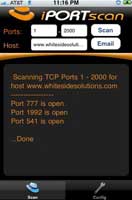
iPortScan from Whiteside Solutions (better known for its paintball training tools) is a port scanner that lets you check what services are listening in on a known system--handy for making sure nothing is open that shouldn't be. You can also do a port scan from a 3G or EDGE network to test what TCP ports are open from the Internet. Features include the ability to set up a profile for the port scan, do a random port scan, adjust the delay time from 0.05 to three seconds, scan using a hostname/URL or IP address, and e-mail your port scan results.
Portscan from digitalsirup.com lets you adjust your speed from aggressive to sneaky. For every discovered service, you get a cell in a table with the port, a short name, and the full name of the service. You can use the integrated browser to explore http ports from within the app.
Price: $1.99
Size: 0.4 MB
3. iPEToolbox
![]() |
You can find a bunch of little utilities that'll look up MAC addresses (MacLookUp) and do subnet calculation (iNetmask from Steve Weiland), but here's one that integrates several tools: iPEToolbox from Kid Mun Yap.
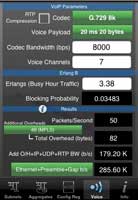
This collection of tools can help you check subnet allocations, route summarization, and configuration register settings for Cisco routers. An IP subnet calculator lets you find the next or previous subnet and provides additional information on subnets being used, such as private range and link local range. An aggregate tool calculates the optimal aggregates given a range of IP addresses (for use in route summarization and to assist in constructing access lists). A configuration register tool provides configuration register values. And a VoIP bandwidth calculator tool estimates bandwidth requirements given the voice codec, payload size, and other details.
Price: $0.99
Size: 0.3 MB
4. SNMPmon
![]() |
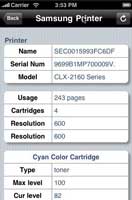
SNMPmon from TTrix Software Design lets you retrieve information from SNMP-capable devices--routers, access points, switches, printers, IP phones, IP cameras.... This utility can display system contacts, network interfaces, routing tables, address resolution protocol tables, TCP connections, UDP listeners, file systems, and printers. One feature allows you to retrieve a subtree of management values displayed in raw format. You can also transmit the information you've just retrieved as an e-mail attachment. This one requires a WiFi or 3G or EDGE connection. The latest edition also lets you copy a configuration file to another device.
Price: $4.99
Size: 0.5 MB
![]() |
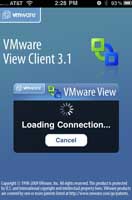
Now, this is thin computing. Sure, PocketCloud from Wyse Technology is a bit pricier than a typical App Store download, but it delivers great value for the money. PocketCloud lets you access and manage a PC or VMware virtual machine from your iPhone. The software uses the Remote Desktop Protocol on a 32-bit or 64-bit Windows operating system or the VMware View client. To keep the connection secure, it supports federal standards for the former and secure sockets layer for the latter. You'll need to load a free Windows companion application on your 32-bit client machines to do server-side Web browsing with the iPhone and achieve keyboard detection. (The companion software lets the iPhone know to invoke its virtual keyboard.)
Price: $29.99
Size: 1.9 MB
6. Snap
![]() |
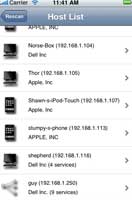
Snap from 9Bit Labs scans the network it's on and discovers nearby PCs, servers, routers, and other iPhones. When Snap finds a device, it displays the manufacturer of the device, type of device, any name information it could discover, along with the device's MAC and IP addresses. For each device that Snap finds, you can also scan it for common services such as HTTP, remote login, AppleTalk, and Microsoft networking. It also links directly to Safari for any HTTP services it finds, enabling you to easily explore devices on the network around you. Snap is useful for discovering open ports and probing public networks to see who else is on.
Price: $1.99
Size: 0.4 MB
7. IP Port List
![]() |
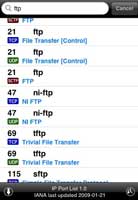
George Dimidik has created a utility that allows you to search and view all Internet Assigned Numbers Authority (IANA)-registered IP port numbers and view the name and brief description of those assignments--handy when you're monitoring a network, managing a firewall, or managing network security and traffic. Since the port list is stored locally, you don't need a network connection to use the tool. Plus, you can download updates from IANA.org at any time by touching the update icon.
Price: $0.99
Size: 0.4 MB
![]() |
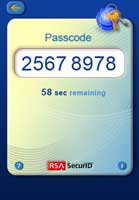
If your organization is using RSA Authentication Manager, this RSA-developed app lets you use your iPhone as a two-factor software authenticator, such as VPNs, wireless LANs, and Web applications. Administrators can deploy software tokens to user devices and users can import the token with a tap.
Price: Free
Size: 1.1 MB
9. Splash ID
![]() |
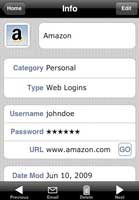
SplashID from SplashData is a password keeper to maintain your usernames, passwords, and other vital information. It has unlimited and customizable record types and categories, 256-bit Blowfish encryption, backup and wireless sync to your PC, a password generator to create hacker-resistant passwords, and URL icons that can be customized for delivering you to the right address so you don't have to type. The latest release--version 5.0--provides a tab that shows you the records you view most often for quick access.
Price: $9.99
Size: 1.6 MB
![]() |
O'Reilly Media isn't the only publisher with network security books available, but it's the only major one we know of that publishes its books in iPhone app format. These digital editions include full book text search, a built-in dictionary, the ability to add your own annotations, a landscape view, working hyperlinks, and a zoom function for images.
Price: $4.99 and less
Size: Under 10 MB
Bonus App! Antivirus, the Game
![]() |
Welcome, Artificial Intelligence Agent 1.4.3. Your assignment from Dead Rat Games is to defend the interweb data in Grid 817 from attacks by cyber-terrorists. To do this you must manage deployment of a new system code-named Defender 001 using tools like a proxy-blaster, decrypter, and authenticator. After all, you have to keep up your security skills, right?
Price: $0.99
Size: 4.6 MB
10 Best Security Apps for iPhone
Apple's App Store currently holds about 85,000 applications for you to download to your iPhone or iPod Touch. Of course, about 84,900 of those programs consist of free and 99-cent games that your seven-year-old would probably find more compelling than you do. So we've scoured reviews, App Store search sites, and recommendation directories to compile this concise list of some of the best security apps currently available.
![]() |
EyeSpyFX has developed mobile applications that allow you to check surveillance cameras from Axis, Sony, D-Link, Linksys, Mobotix, and Vivotek. Each edition lets you set up a camera list and check the views for up to 100 cameras. You can also add cameras and bring up an edit screen to adjust camera details. When a camera goes offline, a status indicator will point that out. And the app will remember your passwords.
2. iPortScan and PortscanPrice: $4.99 and less
Size: Under 0.5 MB
![]() |
iPortScan from Whiteside Solutions (better known for its paintball training tools) is a port scanner that lets you check what services are listening in on a known system--handy for making sure nothing is open that shouldn't be. You can also do a port scan from a 3G or EDGE network to test what TCP ports are open from the Internet. Features include the ability to set up a profile for the port scan, do a random port scan, adjust the delay time from 0.05 to three seconds, scan using a hostname/URL or IP address, and e-mail your port scan results.
Portscan from digitalsirup.com lets you adjust your speed from aggressive to sneaky. For every discovered service, you get a cell in a table with the port, a short name, and the full name of the service. You can use the integrated browser to explore http ports from within the app.
Price: $1.99
Size: 0.4 MB
3. iPEToolbox
![]() |
You can find a bunch of little utilities that'll look up MAC addresses (MacLookUp) and do subnet calculation (iNetmask from Steve Weiland), but here's one that integrates several tools: iPEToolbox from Kid Mun Yap.
This collection of tools can help you check subnet allocations, route summarization, and configuration register settings for Cisco routers. An IP subnet calculator lets you find the next or previous subnet and provides additional information on subnets being used, such as private range and link local range. An aggregate tool calculates the optimal aggregates given a range of IP addresses (for use in route summarization and to assist in constructing access lists). A configuration register tool provides configuration register values. And a VoIP bandwidth calculator tool estimates bandwidth requirements given the voice codec, payload size, and other details.
Price: $0.99
Size: 0.3 MB
4. SNMPmon
![]() |
SNMPmon from TTrix Software Design lets you retrieve information from SNMP-capable devices--routers, access points, switches, printers, IP phones, IP cameras.... This utility can display system contacts, network interfaces, routing tables, address resolution protocol tables, TCP connections, UDP listeners, file systems, and printers. One feature allows you to retrieve a subtree of management values displayed in raw format. You can also transmit the information you've just retrieved as an e-mail attachment. This one requires a WiFi or 3G or EDGE connection. The latest edition also lets you copy a configuration file to another device.
Price: $4.99
Size: 0.5 MB
![]() |
Now, this is thin computing. Sure, PocketCloud from Wyse Technology is a bit pricier than a typical App Store download, but it delivers great value for the money. PocketCloud lets you access and manage a PC or VMware virtual machine from your iPhone. The software uses the Remote Desktop Protocol on a 32-bit or 64-bit Windows operating system or the VMware View client. To keep the connection secure, it supports federal standards for the former and secure sockets layer for the latter. You'll need to load a free Windows companion application on your 32-bit client machines to do server-side Web browsing with the iPhone and achieve keyboard detection. (The companion software lets the iPhone know to invoke its virtual keyboard.)
Price: $29.99
Size: 1.9 MB
6. Snap
![]() |
Snap from 9Bit Labs scans the network it's on and discovers nearby PCs, servers, routers, and other iPhones. When Snap finds a device, it displays the manufacturer of the device, type of device, any name information it could discover, along with the device's MAC and IP addresses. For each device that Snap finds, you can also scan it for common services such as HTTP, remote login, AppleTalk, and Microsoft networking. It also links directly to Safari for any HTTP services it finds, enabling you to easily explore devices on the network around you. Snap is useful for discovering open ports and probing public networks to see who else is on.
Price: $1.99
Size: 0.4 MB
7. IP Port List
![]() |
George Dimidik has created a utility that allows you to search and view all Internet Assigned Numbers Authority (IANA)-registered IP port numbers and view the name and brief description of those assignments--handy when you're monitoring a network, managing a firewall, or managing network security and traffic. Since the port list is stored locally, you don't need a network connection to use the tool. Plus, you can download updates from IANA.org at any time by touching the update icon.
Price: $0.99
Size: 0.4 MB
![]() |
If your organization is using RSA Authentication Manager, this RSA-developed app lets you use your iPhone as a two-factor software authenticator, such as VPNs, wireless LANs, and Web applications. Administrators can deploy software tokens to user devices and users can import the token with a tap.
Price: Free
Size: 1.1 MB
9. Splash ID
![]() |
SplashID from SplashData is a password keeper to maintain your usernames, passwords, and other vital information. It has unlimited and customizable record types and categories, 256-bit Blowfish encryption, backup and wireless sync to your PC, a password generator to create hacker-resistant passwords, and URL icons that can be customized for delivering you to the right address so you don't have to type. The latest release--version 5.0--provides a tab that shows you the records you view most often for quick access.
Price: $9.99
Size: 1.6 MB
![]() |
O'Reilly Media isn't the only publisher with network security books available, but it's the only major one we know of that publishes its books in iPhone app format. These digital editions include full book text search, a built-in dictionary, the ability to add your own annotations, a landscape view, working hyperlinks, and a zoom function for images.
Price: $4.99 and less
Size: Under 10 MB
Bonus App! Antivirus, the Game
![]() |
Welcome, Artificial Intelligence Agent 1.4.3. Your assignment from Dead Rat Games is to defend the interweb data in Grid 817 from attacks by cyber-terrorists. To do this you must manage deployment of a new system code-named Defender 001 using tools like a proxy-blaster, decrypter, and authenticator. After all, you have to keep up your security skills, right?
Price: $0.99
Size: 4.6 MB
Subscribe to:
Posts (Atom)